

Speechify Brings Voice Typing and Assistant Features to its Chrome Extension
Speechify has primarily been a tool for listening to articles, PDFs, and documents. Now, the company is introducing voice detection features to its Chrome extension, including voice typing and a voice assistant that can answer your questions.
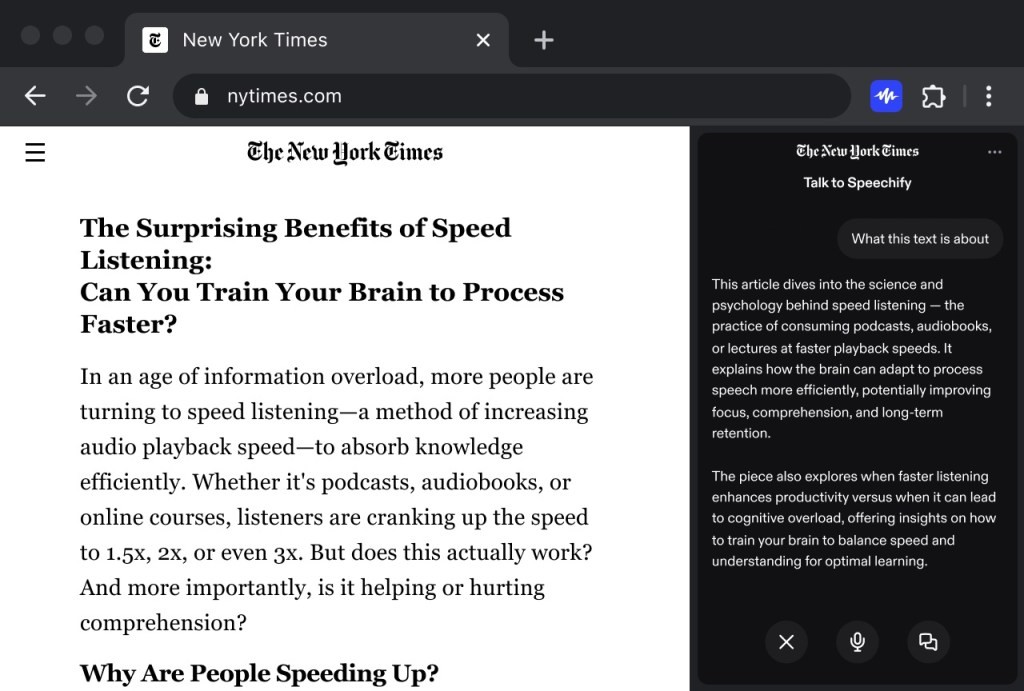
Figure 1. Speechify Adds Voice Typing and AI Assistant to Chrome Extension.
Over the past year, voice detection tools have become more common, thanks to improvements in speech recognition models. Speechify is joining this trend by launching its own dictation tool with support for English. Like other dictation tools, Speechify’s voice typing corrects errors and removes filler words automatically. Figure 1 shows Speechify Adds Voice Typing and AI Assistant to Chrome Extension.
In my brief test of just over a day, I found the tool promising but with room for improvement. While it works well on Gmail and Google Docs, it struggles on platforms like WordPress, where triggering voice dictation can be inconsistent. The company says it is gradually optimizing the tool for popular websites.
In terms of accuracy, Speechify’s word error rate is currently higher than some other tools, such as Wispr Flow, Willow, and Monologue. The company notes, however, that its model improves with use, and the error rate is expected to decrease over time.
In addition, the startup is introducing a conversational voice assistant that appears in your browser’s sidebar. Users can ask it questions about the website, such as “What are the three key ideas?” or “Explain this in simpler terms.”
While ChatGPT and Gemini offer conversational modes, Speechify argues that voice is often treated as an afterthought in these apps. In contrast, the startup’s own tool places voice front and center.
“We believe that chat will always be the default user experience in ChatGPT and Gemini when you open the apps. That’s what their users expect. Voice is always secondary – in many cases, an afterthought,” Rohan Pavuluri, Speechify’s chief business officer, told TechCrunch over email. “From several years of building Speechify, we know there’s a large portion of the market—including our users—who want voice as the primary, default setting every time they open an app and talk to AI.”
One limitation is that Speechify’s assistant doesn’t currently work with browsers that have built-in sidebar assistants, such as OpenAI’s Atlas, Perplexity’s Comet, and Dia. The company isn’t too concerned, as the extension is primarily aimed at Chrome and its large user base.
Speechify plans to gradually roll out both voice typing and the voice assistant across all its desktop and mobile apps.
Looking ahead, the startup aims to develop agents that can complete tasks on your behalf. While it hasn’t revealed its full roadmap, one example is making calls to schedule appointments or waiting on hold with customer support. Other companies, such as Truecaller and Cloacked, are pursuing similar goals.
Source:TC
Cite this article:
Priyadharshini S (2025), Speechify Brings Voice Typing and Assistant Features to its Chrome Extension, AnaTechMaz, pp. 325
Recent Post
-

Google Unveils Keyboard Inspired by Classic Rotary Phones
Rotary phones, once a fixture in mid-century living rooms, faded into basements and.....
-
iOS 26 Introduces a New Way to Save Battery
Modern smartphones are becoming increasingly powerful, intelligent, and versatile.....
-

Why Does This Concept Phone Feature a Robot-Arm Camera?
When activated, the robotic arm raises the camera above the top of the phone and.....
-

How to Use Visual Intelligence on iPhone Running iOS 26
By now, most iPhone users have likely upgraded to iOS 26, and it’s a major update.....
-

ChatGPT: Everything About the AI Chatbot in One Place
Since its launch in November 2022, ChatGPT, OpenAI’s text-generating AI chatbot.....
-
Google’s Gemini 3 Model Keeps AI Excitement Riding High – For Now
Google’s newest chatbot, Gemini 3, has achieved notable improvements across multiple AI benchmark tests,....
-

Google DeepMind Co-Founder Warns: “The AI Industry is in a Bubble”
Speaking on the Hard Fork podcast with hosts Kevin Roose and....
Google Reverses Decision to Block Unverified Android Developers
Google’s August proposal would have required all Android developers to verify their identities starting next....

ChatGPT’s Voice Mode is Now Fully Integrated into the Main Interface
ChatGPT’s voice mode is becoming more convenient. On Tuesday, OpenAI announced an update to the ....
Speechify Brings Voice Typing and Assistant Features to its Chrome Extension
Speechify has primarily been a tool for listening to articles, PDFs,.....
-

Kick-Start Your Language-Learning Journey with Lifetime Access to Babbel
Now is the ideal moment to invest in yourself — and for many, that....
-

Android Auto Worldwide Now Getting Gemini Rollout
Google is rolling out Gemini to Android Auto, its smartphone projection system found in millions of cars, trucks,....
-

Meta to Roll Out Trial Premium Subscriptions Across Instagram, Facebook, and WhatsApp
Meta is preparing to test new subscription plans that offer...
-

How OpenAI and Google Expect AI to Transform Go-to-Market Strategies
For years, startups relied on traditional playbooks when launching....
-

WhatsApp Introduces New Feature Similar to Instagram Notes
WhatsApp is rolling out a feature similar to Instagram Notes, letting users post short text updates visible to....