

How Your Android Phone Is Capable of Detecting Earthquakes
Your Android phone has a hidden life-saving feature you may not know about: it can detect earthquakes and send you early warnings, potentially giving you several seconds to prepare. This feature is already active in over 100 countries, including the U.S., and those precious seconds can make all the difference during a seismic event.
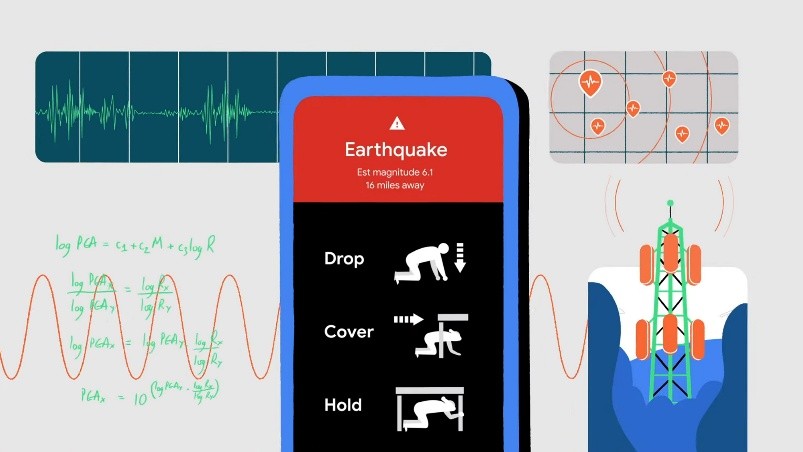
Figure 1. Detecting Earthquakes.
Even better, the alerts are now expanding to Wear OS smartwatches. As long as your watch is connected to the internet, you’ll receive earthquake alerts directly on your wrist—even if your phone isn’t with you. Figure 1 shows Detecting Earthquakes.
Where to Find the Alert Settings
This tool is officially called the Android Earthquake Alerts System. The exact location in your settings menu may vary depending on your phone brand, but on most Pixel and Samsung Galaxy devices, you can find it under:
Settings > Safety and emergency > Earthquake alerts
The system is usually enabled by default when you set up your device, but it’s worth checking in case it’s been disabled [1]. All it takes is a quick toggle to turn it on again. You’ll also see an explanation of how the feature works, safety advice, and a demo mode—though be warned, the alert sound is intentionally loud.
As for Wear OS devices, no extra setup is required. Your smartwatch will automatically mirror the earthquake alerts from your phone, ensuring that you get notified regardless of the device you’re using.
How the Alerts Work
Google uses a combination of data sources to deliver timely earthquake warnings. These include:
- ShakeAlert: A network of seismic sensors managed by the U.S. Geological Survey.
- Android phones themselves: The built-in accelerometers on billions of devices anonymously contribute data, creating a massive, crowd-sourced early warning system.
When an earthquake is detected, your device will display a notification that includes:
- The distance to the earthquake’s epicenter
- The estimated magnitude
- The expected intensity of shaking
For mild tremors, you’ll get a simple pop-up. But for stronger earthquakes, your phone will override silent modes and Do Not Disturb settings, play a loud alert tone, and take over the entire screen with a full warning. It will also offer safety tips, such as: Drop, Cover, and Hold On.
Tapping on the alert gives you more information about the quake and how to stay safe—like steering clear of damaged buildings, checking for gas leaks, and wearing shoes to avoid debris.
These features are designed to be quietly helpful in the background, and ideally, you’ll never need them. But understanding how they work can help you stay calm—and safe—when every second counts.
References:
- https://www.popsci.com/diy/how-android-can-detect-earthquakes/?utm_source=firefox-newtab-en-intl
Cite this article:
Keerthana S (2025), How Your Android Phone Is Capable of Detecting Earthquakes, AnaTechMaz, pp.264.
Recent Post
-

OpenAI May Soon Allow You To ‘Sign in with ChatGPT’ on Third-Party Apps
OpenAI is considering introducing a "Sign in with ChatGPT".....
-

Microsoft Begins Testing Copilot for Gaming in The Xbox App on iOS and Android
Microsoft announced on Wednesday the beta rollout of its Copilot......
-
Nvidia Anticipates Billions in Revenue Loss Due to H20 Chip Licensing Mandates
As Nvidia announced its earnings for the first quarter of fiscal......
-
Apple Reportedly Set to Launch AI-Powered Battery-Saving Feature in Ios 19 For Iphones
Speculation is heating up around the upcoming iOS 19 update.....
-
Android 16 Rolls Out Enhanced Security and Intelligent Anti-Theft Features
Android 16, the upcoming major update for Android devices, is......
-

Children’s Websites Riddled with Tracking and Inappropriate Ads, Study Finds
At first glance, websites designed for children appear safe and......
-
Google Maps User Spots Mysterious Satellite Zooming Over Texas, possibly a Starlink Satellite
In an unexpected twist of digital sleuthing, a Reddit user recently......

Trump Mobile Unveils $499 Android Smartphone with an Unlimited Service Plan Priced At $47.45 Per Month
The Trump Organization has...
How Your Android Phone Is Capable of Detecting Earthquakes
Your Android phone has a hidden life-saving feature you may not know about: it can detect earthquakes and send ...

ElevenLabs Launches Mobile Text-to-Speech App—No Browser Required
ElevenLabs has introduced a new mobile app that allows users to...
-

Research Links Addictive Tech Habits in Teens to Greater Mental Health Risks
Adolescents who become deeply attached to mobile phones,...
-

Researchers Crack Security of eSIM Chips Found in Billions of Devices
A newly discovered vulnerability in widely used eSIM chips could...
-

Rugged Adventure Phone Delivers Sharper Visuals with Built-In Projector
Portable projectors can deliver movies to the campsite or support......
-

What Gibberish Reveals About ChatGPT’s Grasp of Language
By now, most of us have tried to stump a chatbot — asking if it has feelings, testing......
-
How to Disable AI Features in Windows for a More Peaceful Experience
Microsoft—like most major tech companies—is packing artificial......